Back in 2024, during my last year of high school, I built a prototype for two-way translation between American Sign Language (ASL) and English. Most translation tools at the time were built under the misconception that ASL is just a visual form of English, offering little more than speech-to-text for the hearing person in the conversation. I wanted something that treated ASL as the complete language it is-- with its own syntax, morphology, and grammar-- and that worked in both directions:
- ASL Fingerspelling → English: translated fingerspelling into written English, which was then spoken aloud-- removing the need for Deaf individuals to translate their thoughts into English and write them out.
- English → ASL: translated spoken English into ASL signs, performed by an animated avatar-- removing the need for Deaf individuals to read written English and translate it into visual language.
It never came close to capturing the full nuance of visual language, but it was designed to respect and preserve ASL as the primary language. I recorded a full explanation of the project and documented the technical details in a paper on arXiv.
I built this as a hearing student with limited ASL proficiency, and my perspective as a hearing person is limited. My role was to listen carefully and integrate feedback from the Deaf community, and I did my best to approach the project with a mindset of learning and understanding rather than assuming. It would not have been possible without the active involvement and advice of Deaf individuals and ASL experts who generously shared their insights.
Motivation
For over eight years, I had tried learning multiple languages, from Sanskrit and Spanish to Hindi and French, yet I could barely maintain a fluent conversation in any of them. When I moved to Vancouver in 2021, I joined Burnaby South Secondary School, which shares its campus with the British Columbia Secondary School for the Deaf (BCSD). That gave me the unique opportunity to study a new kind of language-- a visual language-- in high school.
ASL wasn't like any of the other languages I had attempted to learn before: it wasn't just about words or pronunciation, but about learning to fully express yourself without the tools you typically use. Over three years, our ASL class showed me how much I took communication for granted, and helped me notice the many hurdles faced by the Deaf community in our hearing-centric society. From my very first week at Burnaby South, I kept having experiences that reminded me why we learn about Deaf culture and accessibility in ASL class. The mission at the end was ultimately what I hoped to achieve with this project.
Language
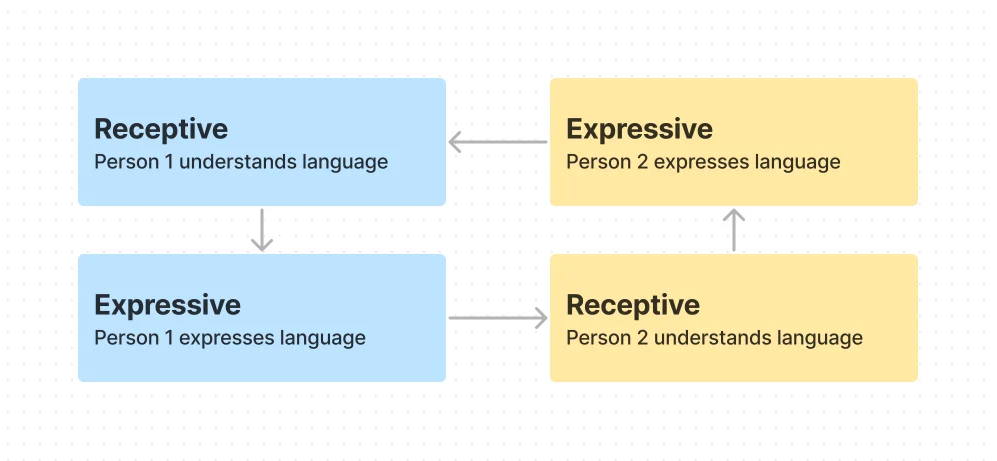
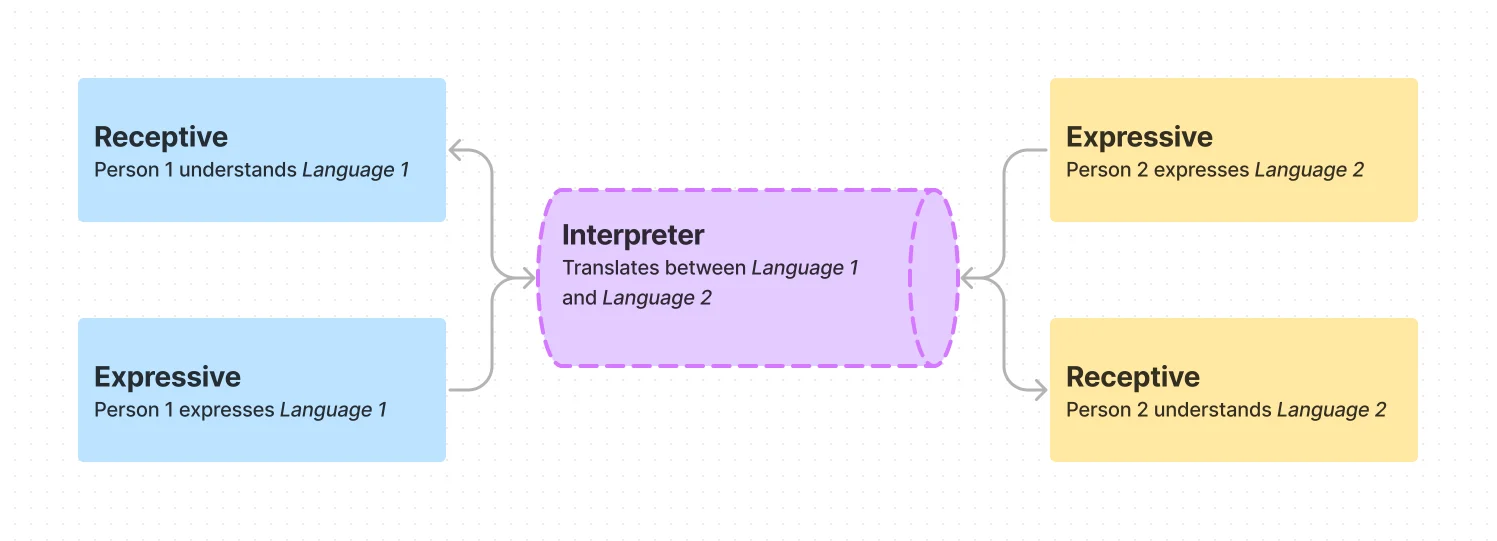
Below, on the left is the typical flow of conversation between two people speaking the same language. On the right is the typical flow of a conversation between two individuals who speak different languages. This features either a tool that can translate between the two languages (Google Translate) or a person who knows both languages and serves as a translator. This is also an ASL interpreter's role in a typical conversation between a Deaf and hearing individual.
In contrast, below is the typical flow of conversation between a Deaf and hearing individual when an interpreter is not present. The most commonly utilized process is writing/typing to communicate, or using a TTS/STT tool that assists the hearing individual.
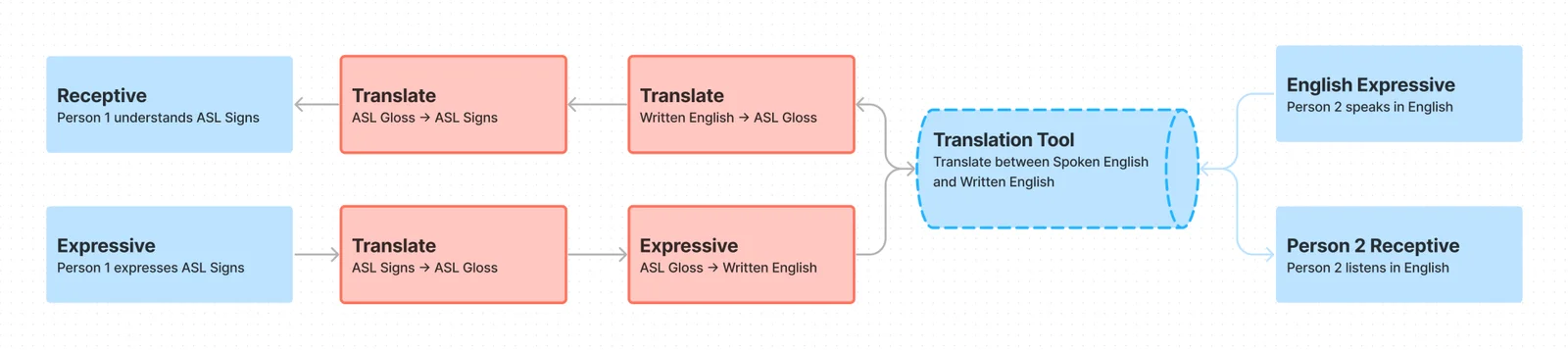
The idea that ASL is merely a visual representation of English is a widespread misconception. In reality, ASL is a distinct language with its own syntax, grammar, and cultural nuances that differ significantly from spoken English. Most direct translation tools, similar to the writing/typing process visualized above, were built without this understanding, failing to capture the depth of ASL communication. Worse, they placed an even larger burden on the Deaf individual, requiring them to accommodate and adapt to meet the needs of the hearing individual.
While ASL signers do have a grasp of English, it is often incredibly hard to constantly translate thoughts from ASL into English, and vice-versa. Essentially, most of these translation tools simply transcribe text, and don't serve any real "translation" purpose. They were built to assist deafness as a disability, but not as a culture or as a language.
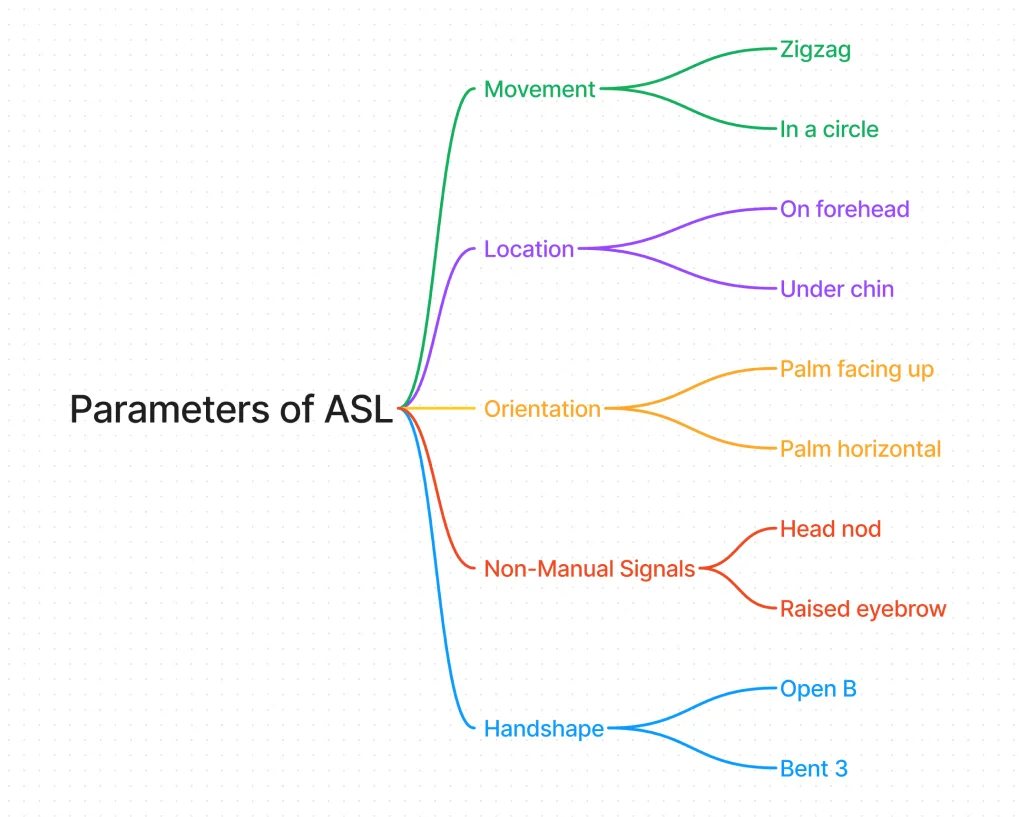
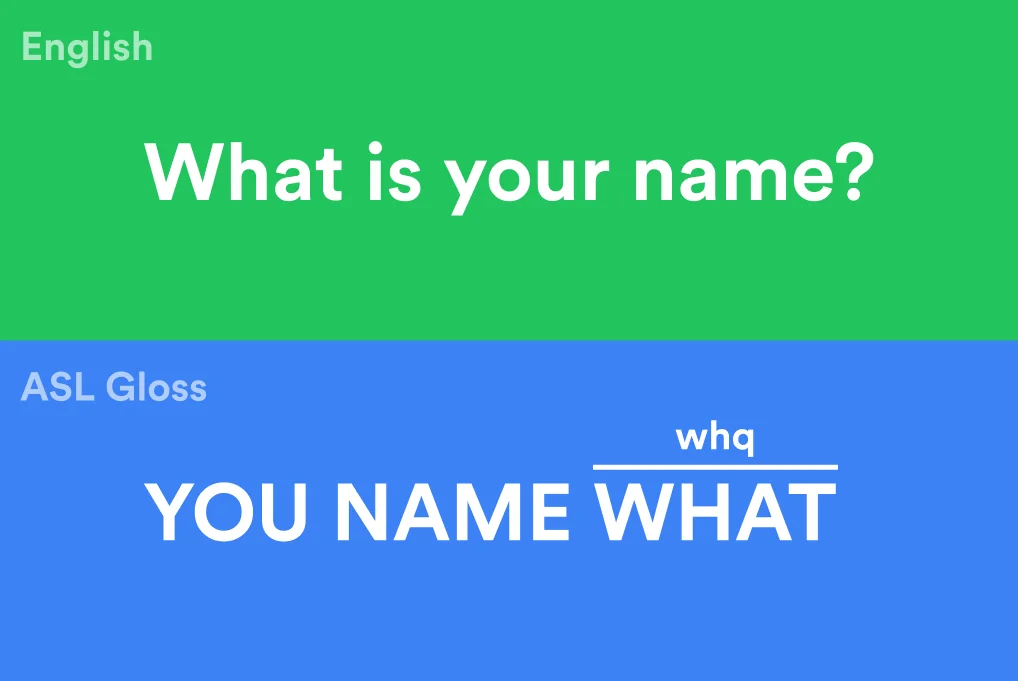
On the left is a visual of the 5 fundamental parameters that define ASL, with some examples of each (there are hundreds!). On the right is an example of the grammatical difference between the same sentence in English and in ASL. I would recommend reading about ASL Parameters, and also about ASL Gloss & Grammar.
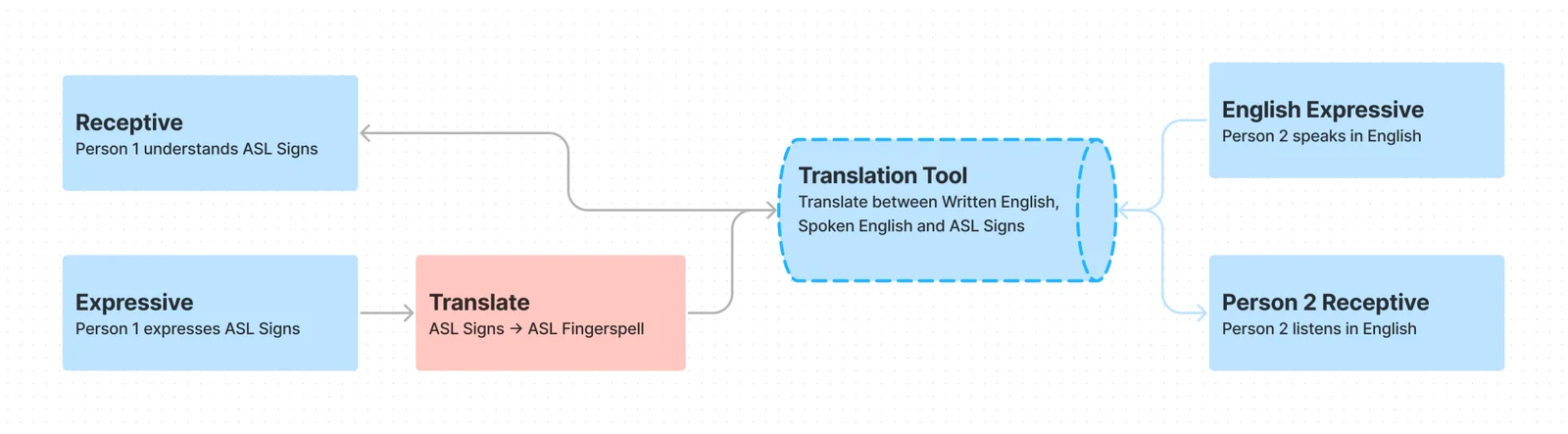
The goal of the project was to eliminate the extra steps that Deaf people have to take because of how hearing-centric our society is. Of the 4 extra steps visualized above, the tool eliminated 3 to a sufficient degree. Here is the new flow:
Technology
The project used computer vision, machine learning, and web animation to create a two-way ASL-English translation system. There were two main components:
- Receptive: Ability to interpret fingerspelling and express as spoken English
- Expressive: Ability to interpret spoken English and express as ASL signs
Receptive
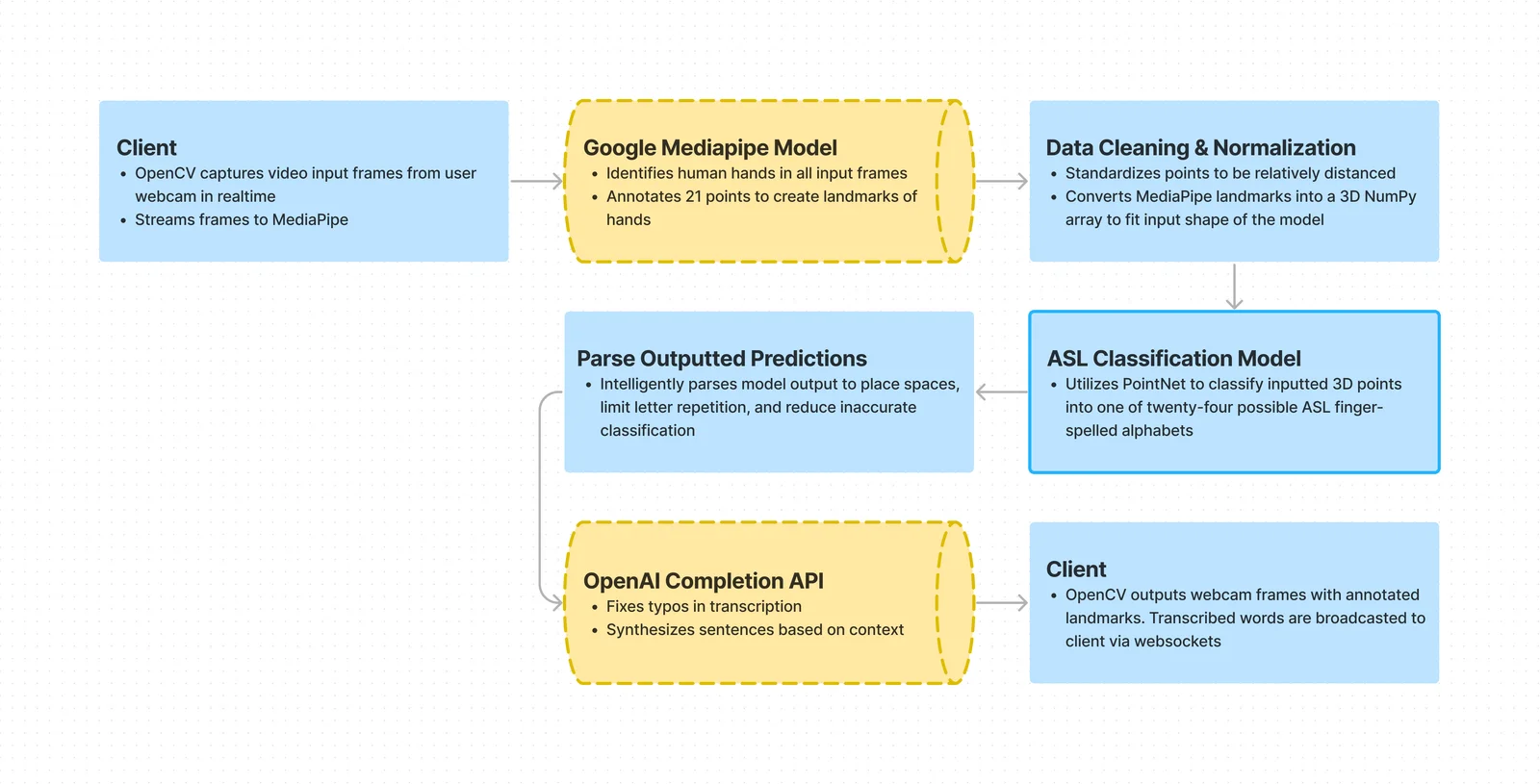
The receptive component focused on translating ASL fingerspelling into English. It involved three stages:
- Detection: Identifying and tracking hands within the frame
- Classification: Recognizing ASL alphabets with normalized points of the hand
- Synthesis: Synthesizing singular alphabets to reduce inaccuracies and form complete sentences
This is what the overall flow looked like:
Detection
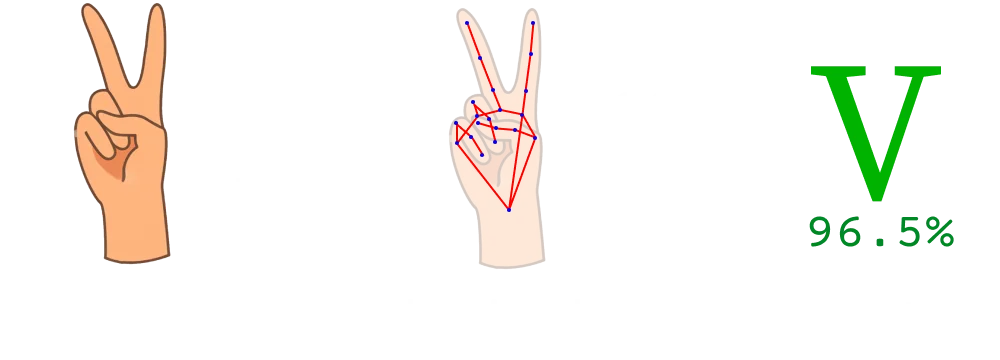
This stage involved the real-time identification and tracking of hand movements and positions using the Google MediaPipe Hand Landmark model. The model captures 21 3D hand key points per frame, providing detailed information on hand orientation and finger position. It also runs entirely locally and doesn't require significant computing resources in a realtime setting. Below is an image of the 21 points detected by the MediaPipe Hand Landmark model.
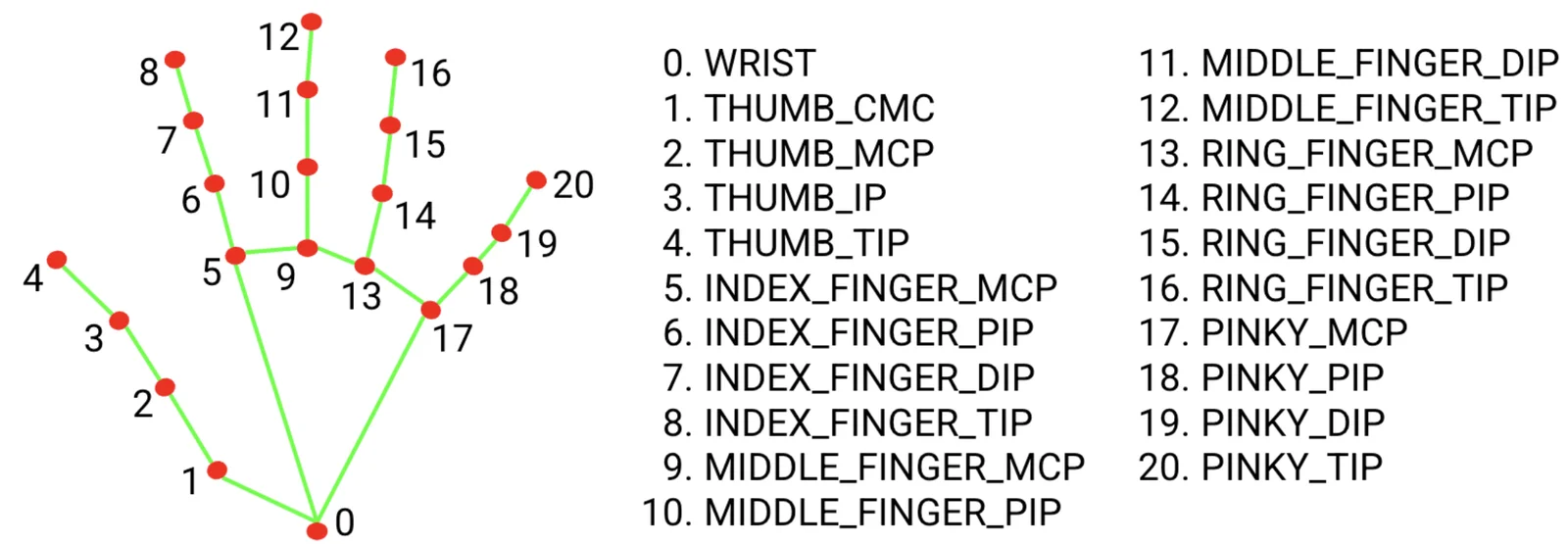
By using these points instead of images of hands (like I previously tried!), the classification process became significantly more powerful:
- It wasn't affected by different backgrounds, hand sizes, skin tones and other factors that would make a typical image classification model significantly more incapable
- It only needed to process a set of 63 numbers (3 for each point!) for each frame instead of an entire image, making it significantly more efficient for real-time use
- It looked a lot cooler
To ensure that the model wasn't affected by distance from the camera, I normalized each point to be relative to the bounds of the hand itself. This provided more standardized training data that helped increase accuracy and reliability.
Classification
Once hand landmarks were captured, the data was fed into a Keras PointNet model, which I trained on over 120,000 labelled images of ASL fingerspelling. PointNet is a deep learning model architecture developed with the intent of classifying 3D point clouds, similar to how the detected hands were now represented.
The PointNet model classified the input data into one of the ASL alphabet signs (except for J and Z, which include movement of the hand to properly express). Below is a demonstration of the training process of the PointNet model.
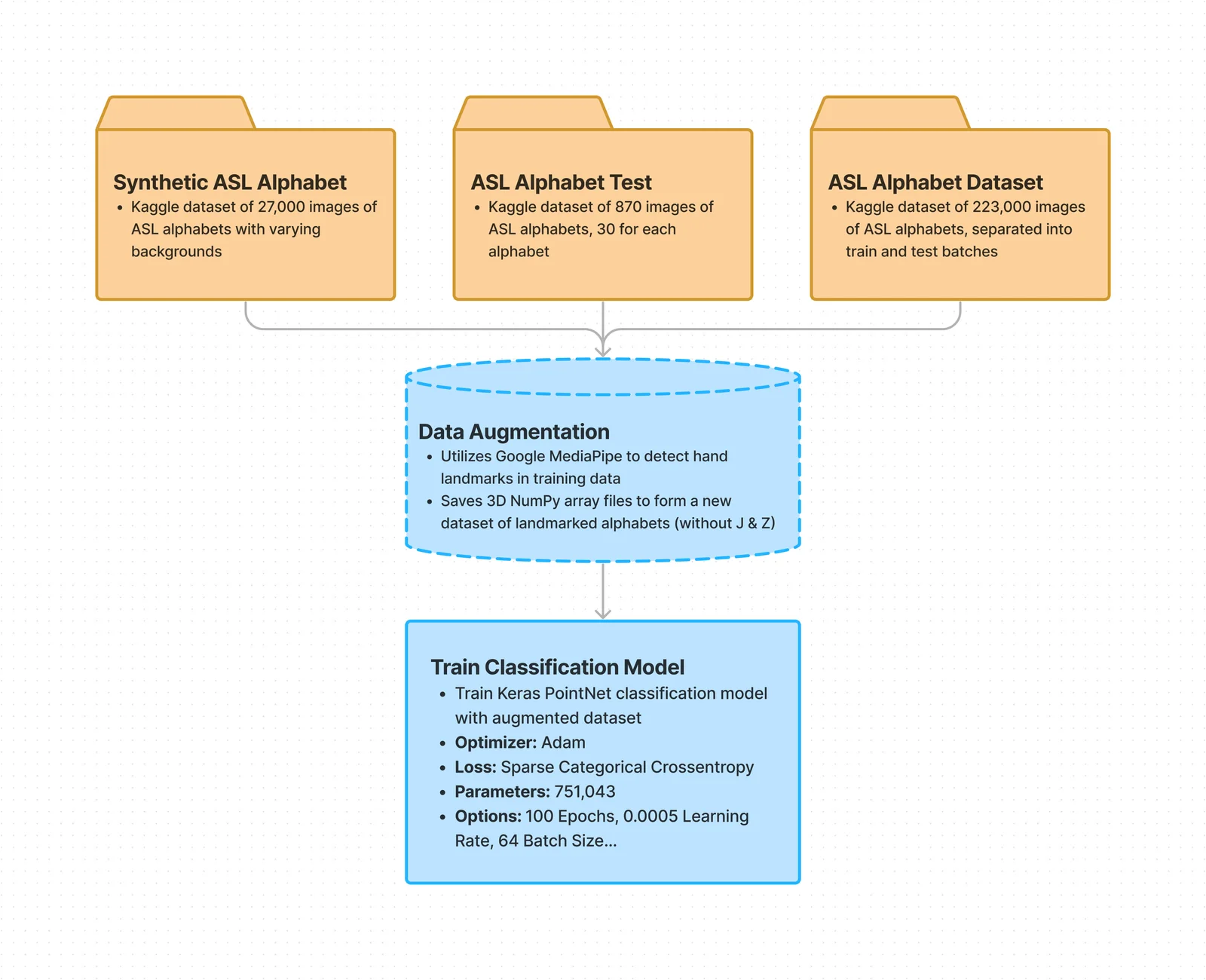
I started out by downloading multiple ASL Fingerspell datasets from Kaggle: One Two Three
I used MediaPipe to identify hand landmarks on every image in the three datasets. Subsequently, I normalized the landmarks and stored the point clouds in NumPy files, creating a combined augmented dataset. Below is a visualized form of the point cloud dataset.
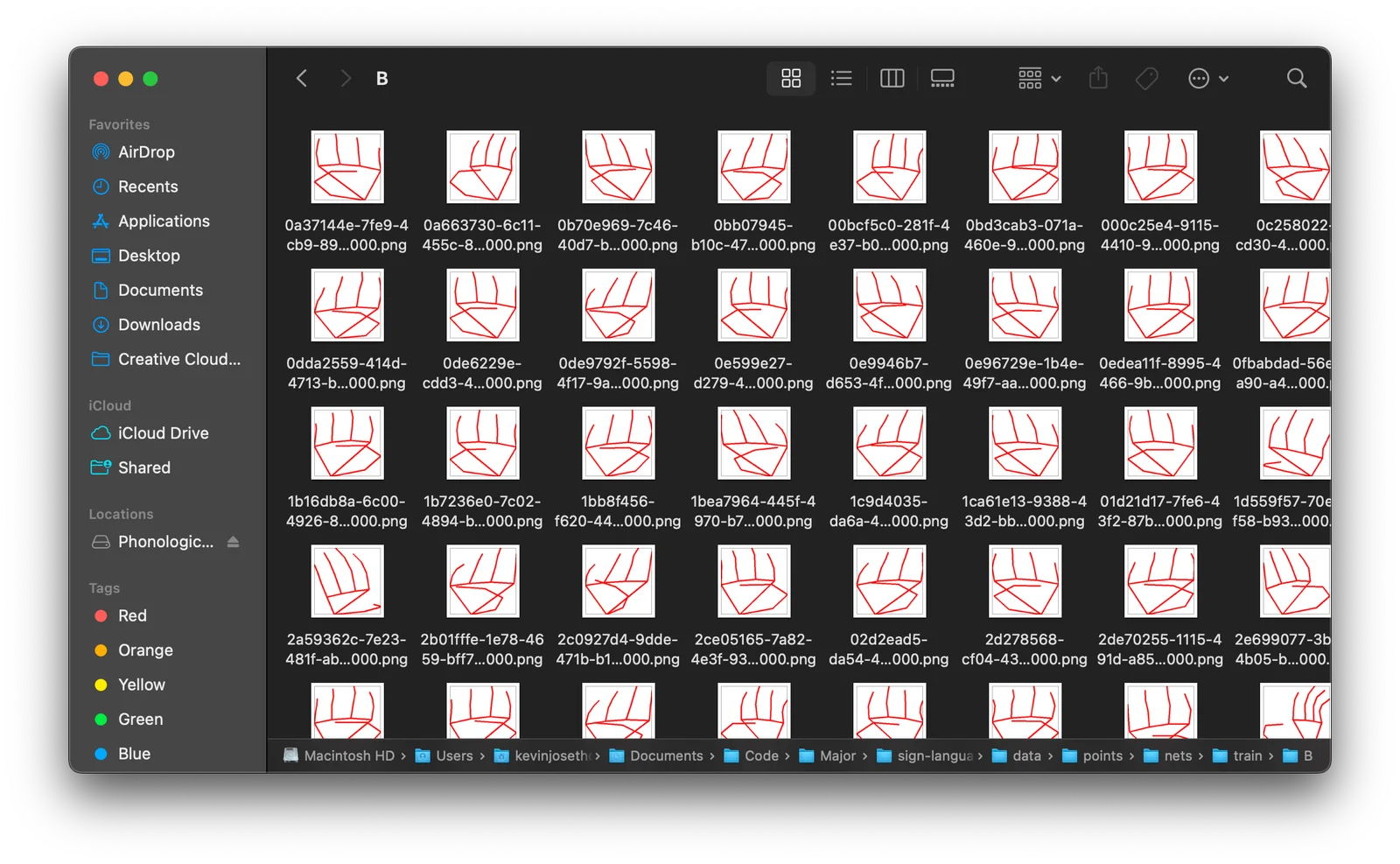
Once I had the augmented dataset, I trained a PointNet model on it. I ended up training the model around 6 times, playing with parameters, mostly adjusting epoch count, batch size, and learning rate. Here is training information from the most accurate run:
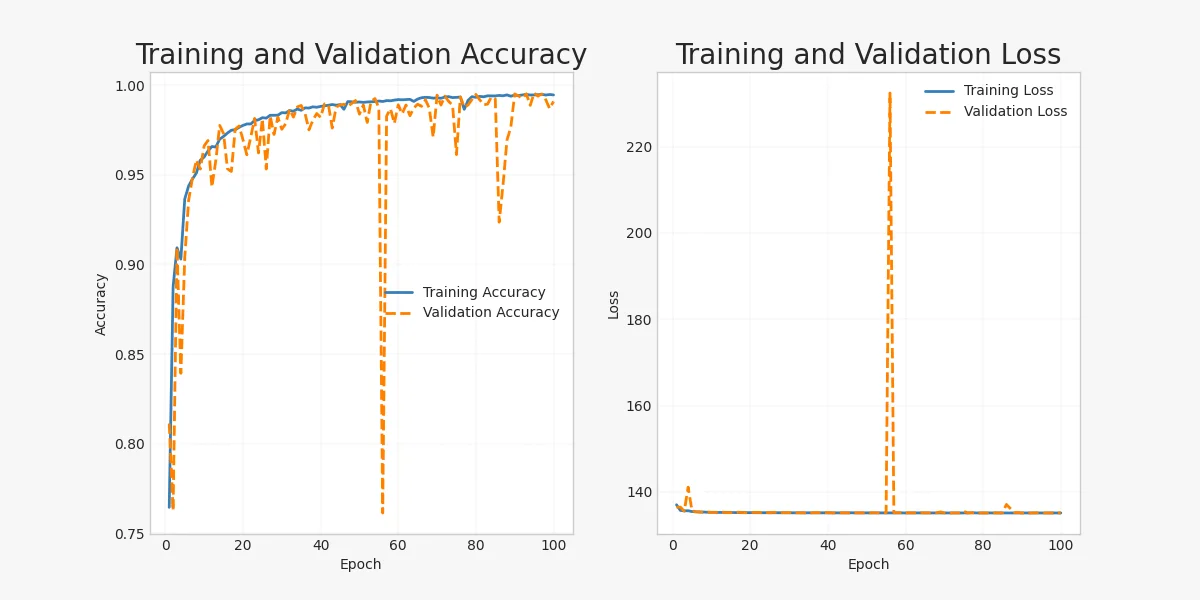
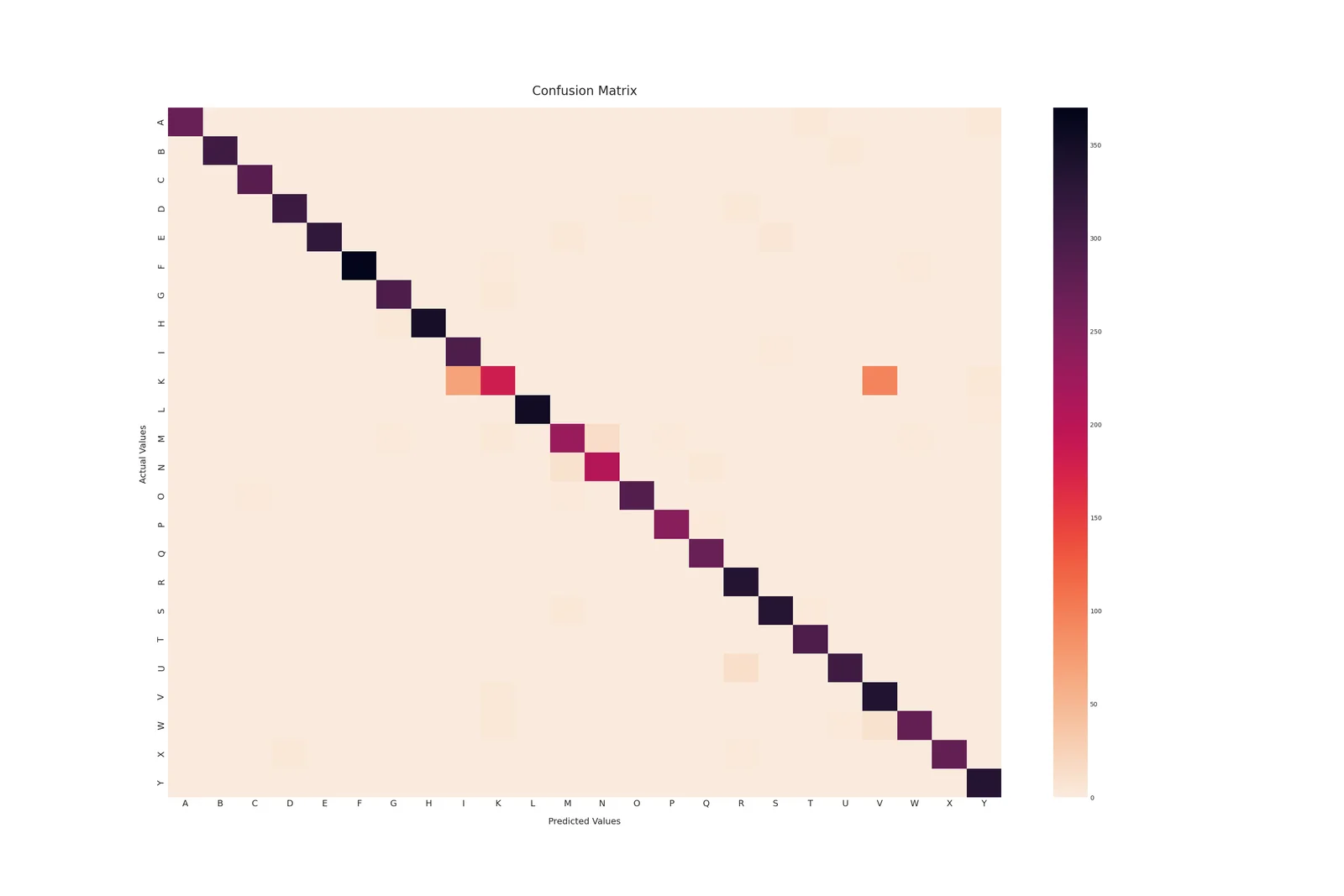
As seen in the confusion matrix, similar fingerspelled alphabets like K-V, U-R and E-S were often misclassified for each other. This was expected and could have been improved with additional training data. There also seems to be an issue in the validation data, as seen in a sudden spike in validation loss in one of the epochs.
Synthesis
The final stage synthesized the classified characters into coherent words and sentences. This involved error correction to adjust for common misrecognition, as well as contextual synthesis to form sentences based on the classified letters.
First, the program used conditionals to differentiate between commonly misrecognized letters. For instance, the letters A-T-M-N-S were commonly mistaken for each other, which could be fixed by checking the relative positioning of certain key coordinates (like the thumb). After ensuring the classified letter was accurate, the program required the recognized letter to be demonstrated for multiple consecutive frames, ensuring the alphabet was properly recognized. It also made sure the same letter wasn't recognized more than two times consecutively, preventing each individual frame from adding a letter to the synthesized text. Finally, it used an LLM to synthesize the cleaned information into a meaningful sentence, applying grammatical rules to form sentences that were syntactically correct in English.
Expressive
The expressive component focused on translating spoken English into ASL, visually represented through a 2D animated avatar using ThreeJS.
To begin, I created a database of over 9000+ words and their corresponding ASL signs. Once again, I used MediaPipe's Pose and Hand Landmark Models to identify body points for each frame in videos of these signs. I also used the all-MiniLM-L6-v2 model to create embeddings for each word, and stored all words, their corresponding embeddings, and their corresponding ASL sign point animations in a PostgreSQL database using pgvector. Although the database only had about 9500 words, using cosine similarity for semantic search drastically increased the effective word count by substituting contextually similar signs for certain words. Here is a demonstration of how the expressive aspect of the project worked:
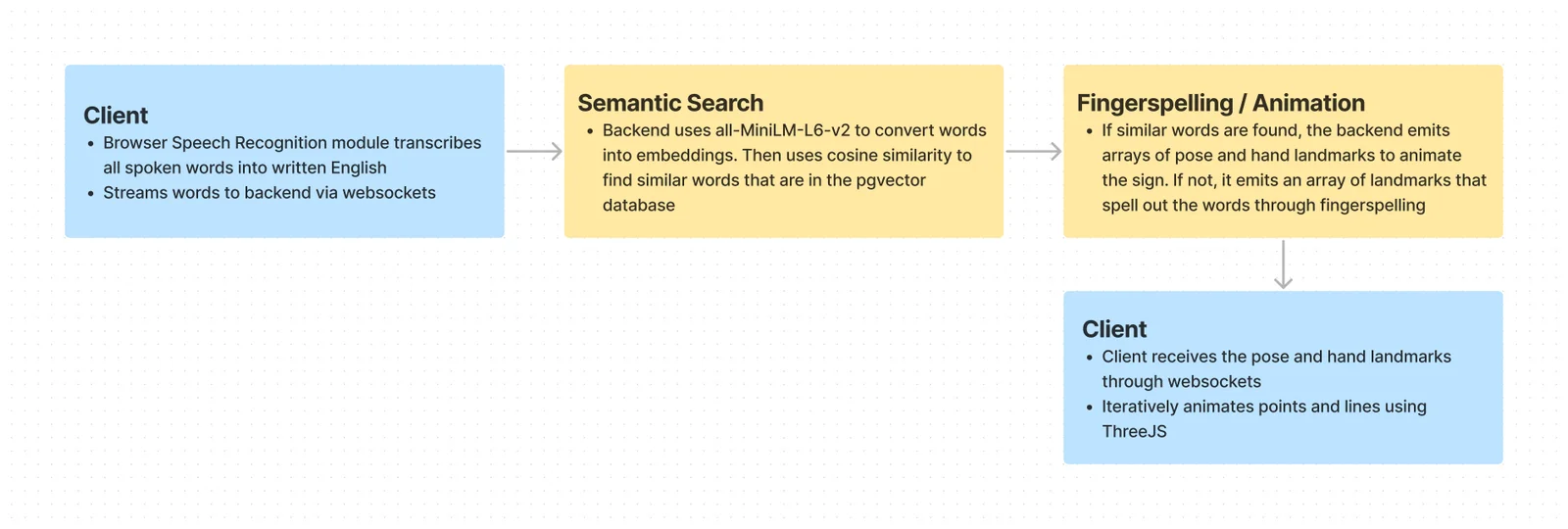
The interface began by using react-speech-recognition to transcribe spoken text into words (replaceable with OpenAI Whisper for more accuracy). When the speaker stopped speaking for a certain amount of time, it transmitted the transcription to the backend through websockets. The backend iterated through the words and created embeddings for each of them. For each word, it queried the database using the cosine similarity function to fetch the animation of the sign with the closest meaning to the spoken word. If there were no similar signs in the database, it generated a fingerspelling animation using the individual letters in the word. After fetching all the animation points, it transmitted them back to the client through websockets, where ThreeJS animated the points to control the 2D avatar that signed each word correspondingly.
Looking Back
Limitations
- Of the four fundamental obstacles in ASL ⭤ English translation visualized above, the project only solved three to a sufficient degree. ASL signers still needed to fingerspell words to actually communicate information-- and fingerspelling only accounts for 25-30% of signed ASL
- The receptive model was far from perfect, and could definitely have been improved with more training data and ML expertise
- The expressive avatar didn't convey all five parameters of ASL, and was simply a stick figure that could be hard to comprehend
Vision
My goal for the project changed as I progressed. When I initially started working on simply recognizing individual ASL alphabets, I did not expect to get very far, let alone develop something capable of sustaining two-way communication between ASL and English. Regardless, I had one main goal: once the project was sufficiently capable, I wanted to set up a desk or TV somewhere between the BCSD and Burnaby South hallways, or maybe even at the main entrance to our school. I hoped that students from BCSD and Burnaby South would stop by to talk to each other without a human interpreter assisting the conversation-- that even if the project was far from capturing all expressive aspects of ASL, the novelty of the fingerspell recognition and avatar visualization would bring some students together.
As the project became more capable, the vision grew with it. I wanted to run a publicly accessible instance that anyone in the world could open in a browser and mess around with, drawing more attention to ASL translation and maybe encouraging more people to consider learning the language. I also wanted to modularize the code so the receptive and expressive halves could function by themselves, seeding other accessibility tools-- like a webcam client that overlays an ASL interpreter avatar onto meetings, or a browser extension that adds an ASL option to YouTube captions.
Some of that ended up happening: the system was packaged as a modular SDK, and I later built a Chrome extension for real-time ASL interpretation of YouTube videos. The harder problems-- interpreting full signs rather than just fingerspelling (perhaps with RNNs/LSTMs, or by classifying against parameter databases like ASL-LEX), and rigging a proper 3D model instead of a 2D stick figure-- remain open, and I hope the project encourages more people to develop viable accessibility technology.